



Core Web Vitals and INP on Mobile Thai Business Sites





A mobile page on a Thai business site is judged by what a visitor sees, and by what happens when they tap. Google publishes two public “good” thresholds: largest contentful paint at 2.5 seconds or less, and interaction to next paint at 200 milliseconds or less. Those are published cutoffs, not a score from this site. This note invents no private millisecond. Building a page that can meet them sits on our web design page. This note does not set a fee.
Short answer: LCP is when the largest image or text block in the first screen has painted. INP is how long the page takes to paint after a tap or a keypress. A heavy theme, a slider, a chat widget, and an unoptimized image are the usual reasons a Thai business page misses Google’s public good line. Fix the LCP element first, then the scripts that freeze the tap. Check Search Console field data, or a real phone. Do not type a lab score from memory. If the site was hacked, stop and use the first-24-hours checklist. If the theme or the HTML is about to change, finish a safe WordPress upgrade before you treat a speed check as finished.
What LCP is
Largest Contentful Paint is the moment the largest content element in the viewport has painted. On a Thai business homepage that is usually the hero photograph, the banner, or a large heading. It is not the footer and not a small logo. It is whatever occupies the most space in the first screen.
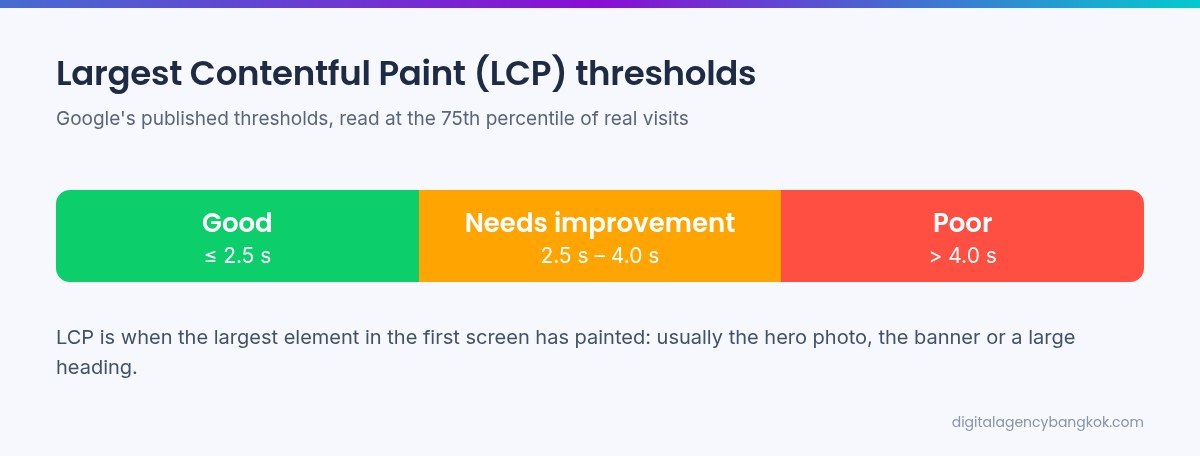
Google’s published “good” threshold for LCP is 2.5 seconds or less. That definition is used when Chrome User Experience Report field data exists. It is the 75th percentile of real visits, over the window Google publishes for that report. A lab estimate is not the field label. This page will not print a lab number, and it will not invent a field number that is not on your screen.
A slow LCP means the thing the visitor is waiting to see arrives late. The image is larger than the phone. It sits in a slider that waits for a script. The theme loads fonts, then icons, then the banner. Open the page on a phone, in a private window, on a mobile network if you can. Write what fills the screen before you scroll: image, heading, or slider frame. Do not guess from a desktop.
What INP is
Interaction to Next Paint is how long the page takes, after a tap, a click, or a keypress, to paint the next frame. It replaced First Input Delay as the responsiveness metric in Core Web Vitals. Google’s published “good” threshold for INP is 200 milliseconds or less. That is a public cutoff for field data. It is not a number this article measured. Do not invent one if the report is empty.
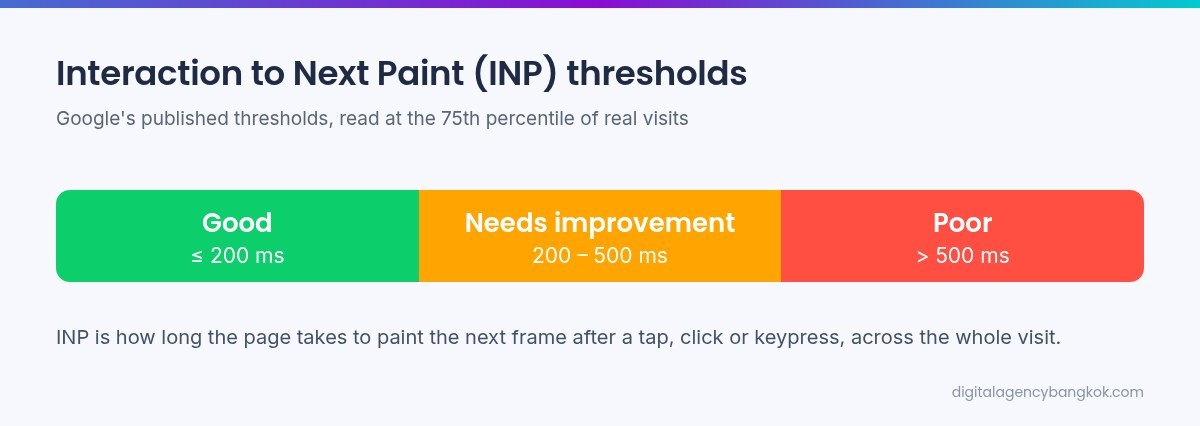
INP covers the whole visit, not only the first tap. A late menu, a form that does nothing after submit, and a button that sits dead while a chat script finishes are INP problems. Scripts from the theme, a slider, a page builder, and a chat widget all want the main thread. One long task on a mid-range Android phone is enough to miss the public 200 millisecond line. This page will not claim how far past.
A tap is not a load time
LCP is arrival. INP is the next paint after you ask the page to do something. A smaller hero can improve LCP and leave INP untouched. A deferred chat widget can improve INP and leave the hero alone. Treat them as two jobs. A plugin that claims to fix both is not a diagnosis.
Why mobile Thai pages miss the public line
Four things show up again and again.

Heavy themes and page builders
A multipurpose theme often loads a slider library, an icon font, an animation pack, and a builder stylesheet on every URL, including a contact page that needs none of them. Those scripts keep the main thread busy while the hero arrives, and again on the menu tap. The site is not slow because it is WordPress. On staging, turn off unused features before you add another plugin. If you cannot name a script, it does not belong above the fold.
Sliders above the fold
A hero slider often holds the LCP image until its script runs. If that slide is the largest element, replace it with one photograph that has width and height, sized for a phone. Put later offers below the fold, or as ordinary links. A slider can stay on a campaign page that is not the homepage LCP. It should not own the first screen if you care about the 2.5 second public line.
Chat widgets
LINE, Facebook chat, a generic live-chat bubble, and a cookie tool inject scripts. Some listen to every tap, which competes with the menu, the telephone link, and the form. A chat button is useful. It does not need to run before the hero has painted. Load it after the page is idle, or after the visitor opens it, on a test copy. Keep one chat path. Remove the extras on staging, tap the menu, and write what changed.
Unoptimized images and a heavy Thai font
The hero file is often a desktop JPEG or PNG, with no width and height and no smaller file for a phone. That file is often the LCP element. A cache plugin will not move the public LCP label until the file is smaller and sized for the viewport. Export a phone-sized image and state width and height. If the heading is the LCP element, a late custom Thai font can hold that paint. Use a system stack, or one family with only the weights the first screen uses.
What to fix first
Order matters. Do one change, then open the page.
- Name the LCP element on a phone. Image, heading, or slider frame. Write the file name or the text.
- If it is a slider, replace it with one sized image, or move the slider off the first screen, on a copy.
- Shrink that image. Give it width and height. Do not upload the desktop original again.
- Defer or remove chat scripts and other third-party scripts that run before the first tap. Keep one chat path.
- Turn off unused theme features that load a library on every URL. Do this on staging, then open the homepage and a contact page.
- Only then look at the rest of the theme. A new theme is not step one. If the HTML is about to change, finish the upgrade path first so you are not measuring a page you will replace.
Do not start with a PageSpeed screenshot. Do not change live slugs or existing Rank Math redirects as a speed tactic. If a public path must move, that is a separate 301, tested once. If the site is compromised, contain it first, then return here.
How to check without a lab
A lab is a simulated phone on a desktop. It is optional, and it is not the source of Google’s public good line. Field data is what Search Console uses when it labels a URL. If that data is missing, say so. Do not type a number into the gap.
Search Console, on mobile
Open the Core Web Vitals report for the live host. Choose mobile. Inspect a URL and write what the screen says about LCP and INP. If English and Thai are both public, inspect one URL in each language. Do not request indexing to refresh a vitals label. That button does not rewrite field data. An empty report means the public sample does not have enough visits yet. That is not a perfect score. Use the phone. Do not invent a percentile.
A real phone, not a screenshot
Load the homepage on a phone, on the network a customer would use, in a private window. Note when the first screen’s main image or heading appears. Tap the menu, the language switch, a telephone link, and the LINE button. If the page sits still after a tap, that is the INP job, even before a report exists. Write the file or the widget you changed, not a made-up millisecond. If a tool shows a field section and a lab section, read the field section. A lab is a hint about which file is large. It is not proof that the public 2.5 second or 200 millisecond line was met.
What this note will not do
- Invent a PageSpeed score, a layout-shift score, a client timing, or any private millisecond proof point.
- Quote a fee. Any published figure lives on the service page. This page holds the order of work.
- Treat a cache plugin as a substitute for a smaller LCP image and a quieter first tap.
- Change live slugs or existing Rank Math redirects as a speed tactic.
- Clean a hacked site, or replace a planned upgrade. Do those first if they are the actual job.
That order is the work. It sits beside web design. This page does not quote a price.
FAQ
What is a good LCP and a good INP?
Google’s published “good” threshold is 2.5 seconds or less for LCP, and 200 milliseconds or less for INP. Those are public cutoffs for field data, not a score from this page. Do not invent a number if Search Console is empty.
Why do sliders and chat widgets matter on a mobile Thai page?
A slider often holds the largest image until its script runs, which delays LCP. A chat widget adds listeners that compete with the tap, which delays INP. One sized image and one chat path, loaded later, is the first check.
Can a PageSpeed lab number replace Search Console?
No. The lab is a simulation. Google’s public good line uses field data when that data exists. Read the mobile Core Web Vitals report. If it is empty, say so. Do not type a lab score as if it were the public label.
What should we fix before a new theme?
Name the LCP element on a phone. Replace a first-screen slider with one sized image. Reduce that image. Defer extra chat scripts. Turn off unused theme libraries on staging. A new theme comes later. If the site was hacked, contain that first.
Where is the price, and how is this different from the other notes?
Not here. We do not set a fee, and we do not print a score. The first day after a hack is the other note. A safe WordPress upgrade covers backup, staging, and redirects. This page is the vitals order: name LCP, quiet the tap, then read field data or a real phone.