



Safe WordPress Upgrade That Does Not Break SEO





A WordPress upgrade should leave every public URL you already rely on still answering. The job is a backup you can restore, staging where the new version fails first, a plugin list you can explain, a 301 only when a path moves, and a Search Console check after the live site has changed. That work sits on our WordPress services page. This note does not set a fee.
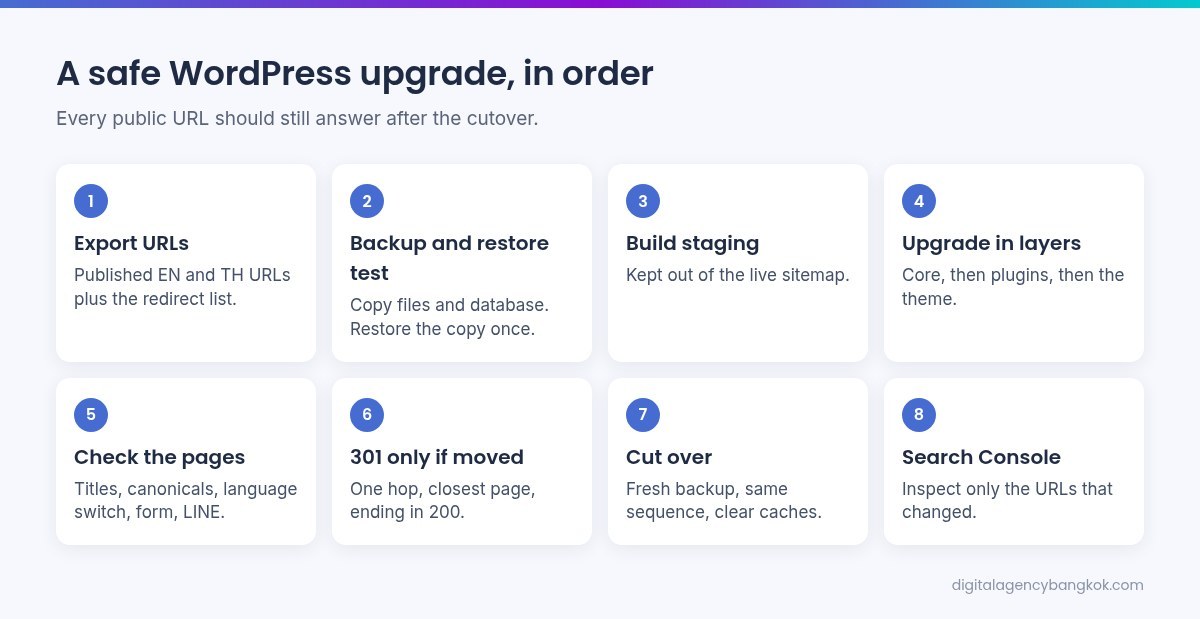
Short answer: Export the live address list. Back up files and the database, and open that copy off the live site. On staging, upgrade core, then plugins, then the theme. Compare titles, canonicals, language pairs, and forms. Add a 301 only if a path moved. After cutover, inspect the URLs that changed. If the site was hacked, stop and use the first-24-hours checklist.
What “does not break SEO” means
SEO here means the public address still matches the page you meant, in the language the visitor asked for. It is not a rank, a score, or a traffic figure. This article will not print those.
Keep five things intentional. A URL that already exists still returns the page, or a single redirect to the page that replaced it. The title, the meta description, and the canonical stay the ones you chose. English and Thai still point at each other if the site is bilingual. The form, the telephone click, and the LINE button still work. The sitemap lists the URLs you want known, and it does not list staging. The upgrade has failed if a rewrite 404s the homepage, a staging noindex lands on production, the language switch opens a draft, or a cache serves yesterday’s HTML.
Backup before any version changes
A host button labelled backup is not a backup until you have opened the files and the database somewhere that is not the live server. If you have never restored that export, you do not yet have a rollback. Copy the database, uploads, the active theme, plugins, must-use plugins, and any extra folders a host or security tool added. Note the WordPress version, the PHP version, the theme, and the active plugin list. That note is a list, not a score.

Write the logins before the window: WordPress admin, hosting, DNS if it sits elsewhere, and Search Console. If one login is missing, stop. A Thai SME site often splits domain, hosting, and admin across accounts. The upgrade waits. Do not email the database to a group chat.
Staging is where the new version may fail
Upgrade on a copy. The live domain stays on the old version until that copy has passed. Staging must not sit in the live sitemap, and it must not be the canonical of a live page. Block it with a noindex, a password, or a crawler rule, then read the HTML head to confirm. Do not copy that block, or a staging robots.txt, onto production.
Keep https, www, and the trailing slash aligned with live. Search-replace staging so menus point at staging, and write that you did this. If PHP cannot match, write that the test is incomplete. A blank screen means restore that staging copy and stop.
Plugin and theme audit, one layer at a time
Core, plugins, and the theme are three upgrades. Do them in that order on staging. Update one layer, open the site, then the next. A pile of updates that fails leaves you guessing which package moved the title, the form, or the redirect table.
List what is active and what it writes into the public page. Rank Math owns titles, the sitemap, and redirects on this kind of site. A cache plugin can hide a new file. A security plugin can block file changes. A form plugin owns the enquiry. A multilingual plugin owns the English and Thai pair. If you cannot say what a plugin does, deactivate it on staging and write what changed. Do not delete it on production.
Open the homepage, contact, one service page, one post, and the language switch both ways. Send a test form to a mailbox you control. Do not change permalink structure in the same window. If a plugin has no update and core refuses to finish, that plugin is the blocker. Update, replace, or remove it on staging, then look again.
301s only when a path actually moves
Most WordPress updates do not move URLs. If the post name, the parent, and the permalink settings are unchanged, do not add a redirect “to be safe”. Add a 301 only if a public path no longer returns that page. Point it at the closest page, not the homepage, unless nothing closer exists. One hop, then a 200. Do not send both languages to one language unless one language was removed on purpose.
Export the existing redirect list first. Keep rules that already work. Do not edit a live Rank Math redirect as part of a version bump if that path did not change, and do not change a live slug because a new plugin prefers another spelling. Leave http, https, www, and the trailing slash alone unless they are already wrong. If Rank Math and the server both redirect the same path, use the tool that already owns the list. Open the old address in a private window. Write whether you got one redirect and a final 200.
Cut over only after staging passed
Take a fresh production backup, then repeat the sequence that passed on staging. Apply core, then plugins, then the theme. Do not add a plugin in the same window. Clear the cache the site already uses. That is not a speed score. How a Thai page feels on a phone after the HTML is stable is a separate note: Core Web Vitals and INP on Thai sites.
Walk the live URLs: homepage, contact, one service page, one post, the language switch, the sitemap, robots.txt, and wp-admin. Confirm the sitemap does not mention staging, and that noindex is absent on pages you want indexed. Read one title and one canonical. Send one test form. If something fails and you cannot name the cause, restore the backup you just took. This page does not state how long a maintenance message lasts. If you have not rehearsed a restore, do not start.
Search Console after the live site has changed
A version number is not a new site. Change of address is the wrong tool when the domain stayed put. Use the Search Console property already verified. Inspect a URL whose path stayed the same and read what the screen shows: indexed or not, the canonical Google reports, and whether a noindex or a redirect appeared. If English and Thai are both public, inspect one URL in each language. Do not assume one prefix property covers both hosts.
Request indexing only for a URL whose path or HTML changed, after it returns 200 or one 301 to a 200. Do not request indexing for staging, or for a 404. Submit the sitemap if the file changed or the last read failed. A second submit does not force a full crawl. This article will not invent how many URLs Google fetches, or on which day. On a later working day, open the Pages report and record not found, a robots block, a noindex, or a redirect on a URL you meant to keep as 200. Do not type a lost-page count from memory.
Checklist you can hand on
- Export published URLs for English and Thai, including paths that already redirect.
- Export the redirect list. Do not edit a rule whose path did not change.
- Copy files and the database. Restore that copy once, not on the live domain, before the window.
- Write the logins. If one is missing, wait.
- Build staging. Keep it out of the live sitemap. Do not copy a staging noindex onto production.
- Upgrade core on staging, then plugins, then the theme. Open the site after each layer.
- Check titles, canonicals, the language switch, the form, LINE, telephone, and one post.
- Add a 301 only where a public path moved. One hop, to the closest page, ending in 200.
- Fresh production backup. Repeat the same sequence. Clear caches. Walk the live URLs.
- If you cannot name the fault, restore. If the cutover holds, inspect changed URLs in Search Console. Leave unchanged URLs to the normal crawl.
That list is the work. It sits beside WordPress services. This page does not quote a price.
What this note will not do
- Invent downtime, a ranking change, a speed score, or a count of pages lost or gained.
- Quote a fee. Any published figure lives on the service page. This page holds the order of work.
- Clean a hacked site. Do not upgrade a site you have not contained.
- Replace a Core Web Vitals check. Do that after the HTML is stable, not as proof the version number is correct.
- Change live slugs, permalink structure, or existing Rank Math redirects unless a public path truly moved, and then only with a 301 you can test.
FAQ
Should I update WordPress directly on the live site if I am in a hurry?
No. The live site is the rollback target, not the test. Open the backup off the live domain first. If you cannot restore, you are without a way back.
Does every WordPress update need a 301?
No. A 301 is for a URL that used to exist and now lives elsewhere. If the permalink, the parent, and the slug did not change, do not add a redirect, and do not point leftover paths at the homepage.
Will Search Console recrawl the whole site when I request indexing?
No. Request indexing only for a URL that changed, after it returns 200 or one 301 to a 200. It does not recrawl every page, and it does not repair a 404. Do not invent a crawl count or a date.
What if a plugin blocks the core upgrade?
That plugin is the blocker. On staging, update it, replace it, or remove it, then open the homepage, a form, and one post. Do not delete it on production because it looks old. If the site was compromised, follow the hacked-site checklist instead.
Where is the price, and how is this different from the hacked-site and vitals notes?
Not here. We do not set a fee, a downtime figure, or a score. The first day after a hack is the other note. Core Web Vitals and INP on Thai pages are a later check, after the URLs are still in place. This page is the order of work: backup, staging, plugin audit, 301s only when a path moves, then Search Console.