The word "sitemap" gets used in two genuinely different contexts, and mixing them up is a surprisingly common source of confusion — even among people who work with websites regularly. One kind of sitemap is a visual planning document, sketched out early in a website project to organize pages before any design work begins. The other is a technical file, invisible to most visitors, that quietly helps search engines understand and crawl a site efficiently. Both matter, both are called "sitemaps," and understanding the difference — along with why each one genuinely matters — is worth clearing up properly.
This article explains what a sitemap actually is, in both senses of the term, why each type matters, and how they get used in practice.
The Two Meanings of "Sitemap"
A Planning Document vs. a Technical File
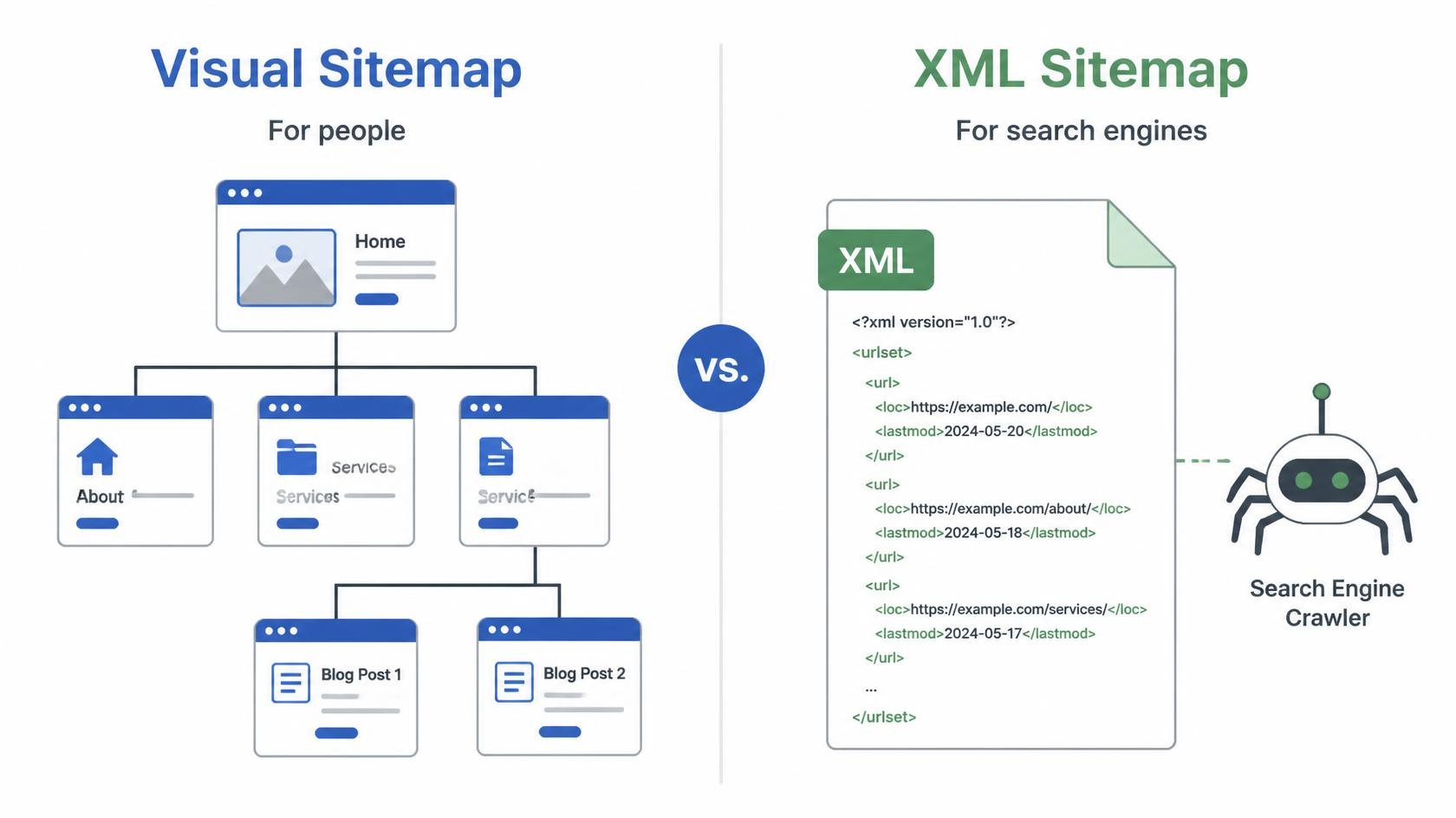
Visual sitemap (information architecture) — a diagram or outline, typically created early in a website project, showing every planned page and how they connect to each other through navigation, essentially serving as a blueprint for the site's overall structure before any design or development begins.
XML sitemap (technical file) — a structured file, usually written in XML format, listing a website's URLs in a format search engines can read directly, helping those search engines discover and crawl a site's pages more efficiently.
Both serve the same underlying purpose in a broader sense — helping something (a design team, in one case; a search engine, in the other) understand how a website is organized — but they're built at different stages, for different audiences, using entirely different formats.
The Visual Sitemap: Planning a Website's Structure
Why This Comes Before Design Work
A visual sitemap is typically one of the earliest deliverables in a well-run website project, created after a business has defined its goals and gathered core content, but before any actual visual design begins. It exists to solve structural questions — what pages exist, how they relate to each other, what belongs in the main navigation versus a secondary or linked page — while those questions are still cheap and easy to adjust, rather than discovering structural problems after a site has already been designed and built around a flawed or incomplete structure.
What a Visual Sitemap Typically Includes
Every planned page on the site, organized hierarchically from the homepage down through main sections and subsections.
The intended primary navigation structure, showing what appears in the main menu versus what's accessible only through internal links.
Relationships between pages, particularly for sites with more complex structures — showing, for instance, how a blog category page connects to individual blog posts, or how a product category connects to individual product pages.
How This Looks in Practice
A mid-sized consulting firm planning a new website, for example, might sketch out a visual sitemap showing a homepage at the top, branching down into Services, About, Case Studies, Blog, and Contact as primary navigation items, with the Services section further branching into individual pages for each distinct service line the firm offers. Working through this structure visually, before any design work begins, often reveals gaps early — perhaps the firm realizes it has no clear page for a specific service it wants to promote, or that two planned pages actually cover such similar ground that they should be consolidated into one — corrections that are far easier and cheaper to make on a simple diagram than after a page has already been fully designed and built.
Why Skipping This Step Tends to Cause Problems Later
Websites built without a clear sitemap planning stage often end up with structural issues that are difficult to fix after the fact — pages that don't clearly fit anywhere in the navigation, confusing or inconsistent menu organization, or important content that's technically present on the site but essentially undiscoverable because no clear path leads to it. A visual sitemap, created deliberately before design work begins, is one of the more effective, low-cost ways to avoid these problems entirely.
The XML Sitemap: Helping Search Engines Crawl a Site
What an XML Sitemap Actually Is
An XML sitemap is a structured, machine-readable file — typically named something like sitemap.xml — listing the important URLs on a website, along with optional additional information like when each page was last updated, how frequently it tends to change, and its relative priority compared to other pages on the site. This file is submitted to search engines (commonly through a tool like Google Search Console) to help those search engines discover and crawl a site's content more efficiently.
Why Search Engines Benefit From Having One
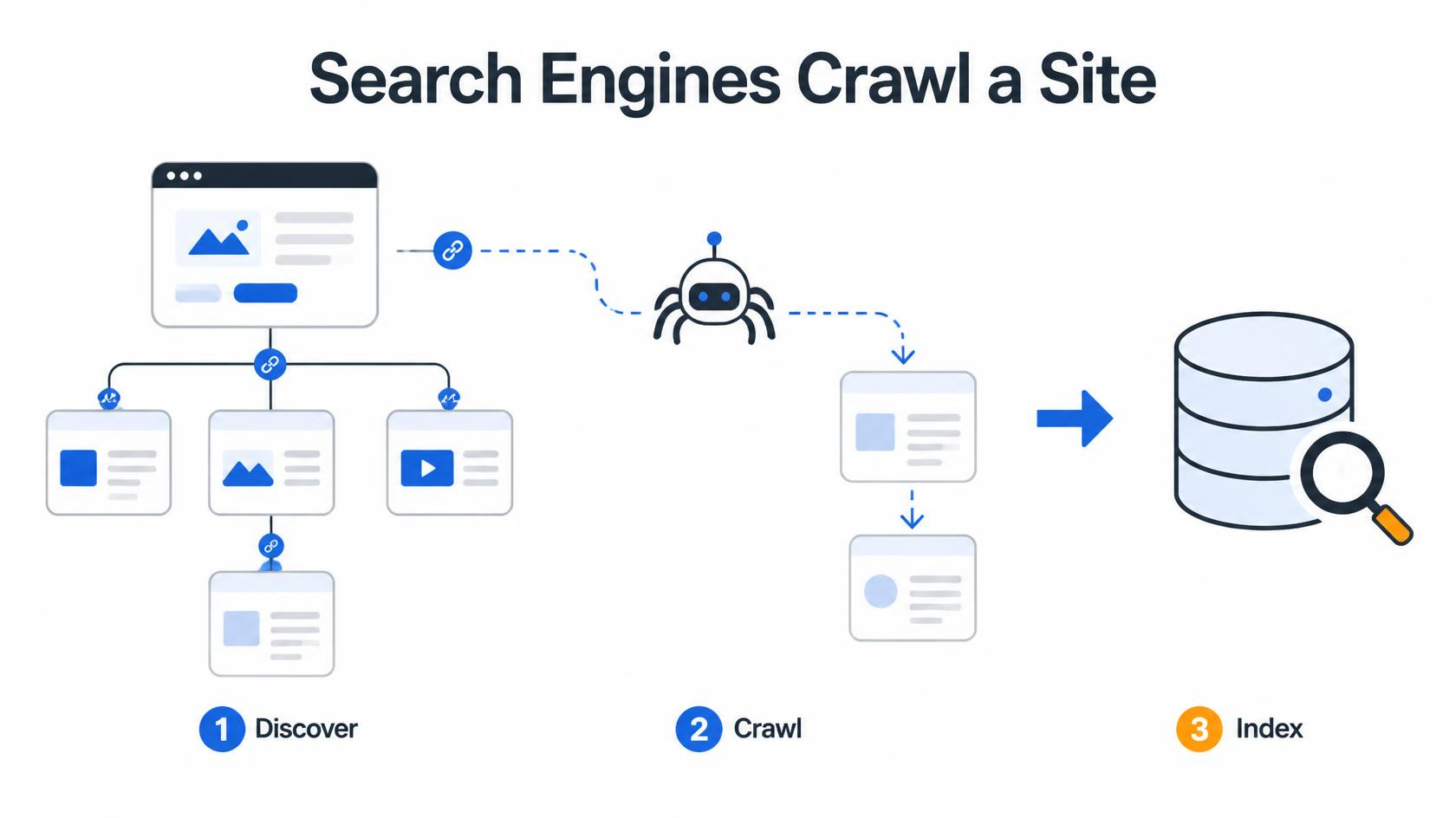
Improved discovery of pages that might otherwise be missed — particularly relevant for pages with few or no internal links pointing to them, which a search engine crawler following links alone might never actually find.
More efficient crawling for larger or more complex sites — a sitemap gives search engines a direct, comprehensive list to work from, rather than relying entirely on discovering every page purely by following links from page to page.
Faster discovery of new or recently updated content — since a sitemap can be updated and resubmitted whenever new pages are added, helping search engines find and index fresh content more quickly than they might through organic crawling alone.
Additional context about page priority and update frequency — helping search engines understand which pages are most important or most likely to have recently changed content worth re-crawling.
When an XML Sitemap Matters Most
Large websites with hundreds or thousands of pages, where relying purely on internal linking to guide crawlers to every page becomes increasingly unreliable as a site grows.
New websites with few existing backlinks or established authority, since search engines may not yet be crawling the site frequently or thoroughly without the additional guidance a sitemap provides.
Sites with pages that are difficult to reach through normal navigation — archived content, deeply nested pages, or content not prominently linked from the main site structure.
Sites that update content frequently, such as news publishers or ecommerce sites with constantly changing product listings, where timely re-crawling of updated content is particularly valuable.
A Practical Illustration
A large ecommerce retailer with several thousand product listings, for instance, generally benefits significantly from a well-maintained XML sitemap, since relying entirely on a search engine discovering every individual product page purely through following internal category and navigation links would likely mean some deeper, less prominently linked product pages go undiscovered or get crawled only infrequently. A sitemap that's automatically updated whenever new products are added — and that flags recently updated listings for more frequent re-crawling — helps ensure the retailer's full catalog stays properly represented in search results, rather than only the most prominently linked subset of products.
How These Two Types of Sitemaps Actually Relate to Each Other
They're Connected, Even Though They Serve Different Audiences
While a visual sitemap and an XML sitemap are built at different stages for different purposes, they're not entirely unrelated — a well-planned visual sitemap, mapping out a clear, logical site structure from the start, tends to result in a site that's also easier to represent accurately and comprehensively in an XML sitemap later. A site built without much structural planning often ends up with orphaned pages, inconsistent hierarchy, or confusing organization — problems that make generating an accurate, genuinely useful XML sitemap considerably harder after the fact.
How XML Sitemaps Actually Get Created and Maintained
Most Modern Platforms Generate Them Automatically
For businesses using common content management systems like WordPress, XML sitemap generation is typically handled automatically, either through built-in platform functionality or a widely used plugin, updating automatically whenever new pages or posts are published, without requiring manual maintenance.
What Still Requires Attention
Confirming the sitemap is actually being submitted to search engines through tools like Google Search Console, rather than assuming its mere existence on the site is sufficient.
Periodically checking that the sitemap doesn't include pages that shouldn't be indexed (like internal search results or duplicate content variations), since including these can create unnecessary confusion for search engines.
Verifying, after a website redesign or migration, that the sitemap correctly reflects the site's current, updated structure rather than referencing outdated URLs from a previous version of the site.
Sitemaps for Different Types of Content
Beyond Standard Web Pages
Some websites benefit from multiple, separate sitemaps addressing different content types, rather than a single combined sitemap covering everything.
Standard page sitemaps covering core website pages.
Image sitemaps, providing additional information specifically about images on a site, which can help those images surface in image-specific search results.
Video sitemaps, similarly helping video content get properly discovered and understood by search engines.
News sitemaps, used by news publishers specifically to help time-sensitive content get discovered and indexed quickly, given how much value fresh news content loses if it isn't indexed promptly.
Frequently Asked Questions
Do I need to create a sitemap manually, or does my website platform handle it automatically?
Most modern content management systems and website builders, including WordPress with commonly used SEO plugins, generate and update an XML sitemap automatically as new pages and content are published, without requiring manual creation. It's still worth confirming the sitemap exists, is accurate, and has actually been submitted to search engines through a tool like Google Search Console, rather than assuming automatic generation alone guarantees it's being properly used.
Does having a sitemap guarantee that all my pages will be indexed by search engines?
No — a sitemap helps search engines discover pages more efficiently, but it doesn't guarantee indexing. Search engines still evaluate factors like content quality, whether a page is blocked from indexing through other technical settings, and overall site authority when deciding whether to include a specific page in their index. A sitemap improves the odds of discovery and efficient crawling, but it isn't a direct override of a search engine's broader indexing decisions.
How is a visual sitemap different from a website's actual navigation menu?
A visual sitemap is a planning document, typically created before a site is built, showing the complete intended structure of the site, including pages that may not appear directly in the main navigation menu at all. A navigation menu is the final, live, user-facing subset of that structure, showing only the specific pages and sections a business has chosen to feature prominently for visitors. A sitemap is generally more comprehensive than a navigation menu, since it maps the site's full structure rather than just its most prominent, featured pathways.
How often should an XML sitemap be updated?
For most modern websites using platforms that generate sitemaps automatically, updates happen in real time or near real time whenever new content is published, without requiring manual intervention. For sites managing their sitemap more manually, or after a significant structural change like a redesign or migration, it's worth deliberately reviewing and resubmitting the sitemap to ensure it accurately reflects the site's current structure, rather than assuming it will stay accurate indefinitely without any check.
Can a small website with only a handful of pages skip having a sitemap?
An XML sitemap is less critical for very small sites, since search engines can typically discover a handful of well-linked pages through normal crawling without much difficulty. However, since most modern platforms generate a sitemap automatically at no additional effort, there's generally little reason to skip it even for a small site — and a visual sitemap for planning purposes remains valuable even for small projects, since even a simple site benefits from having its structure thought through deliberately before design work begins, rather than assembled without a clear plan.