


Real Estate Website Structure in Thailand: Project Site vs Agent Site





A real estate website in Thailand is usually one of two businesses under one label. A project developer sells named projects the company controls. An agent or broker site routes a person to an agent about inventory the office represents, which may include other people’s stock. How this vertical is scoped sits on our real estate web design page. This article sets no fee, no inquiry count, no conversion rate, and no rank.
Short answer: Build the tree for the business that owns the lead. A developer site needs a project landing page and a project inquiry the gallery will honour this week. An agent site needs a listing or an area, then an agent lead that names who replies. Do not paste a developer sitemap onto a brokerage. The hotel note on hotel website SEO versus OTA dependence is another vertical. The sibling on why real estate websites fail in Thailand covers common breaks, not this structure.
A project site and an agent site are not the same tree
A developer’s unit of content is the project. The hoarding, the gallery, and the URL should use the same name. A search for that name should open that project, not a grid of unrelated listings.
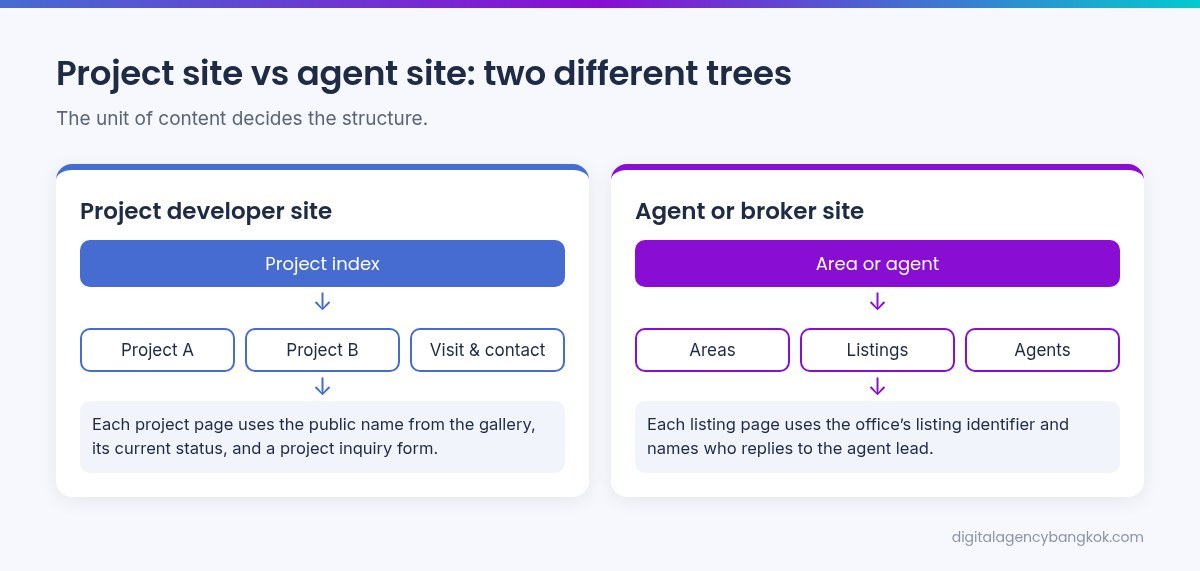
An agent or broker’s unit is the listing, the area, or the agent. The page may say the office represents the property. It must not say the office developed it unless staff will say that. A firm that does both has two products and needs two labeled sections, not one menu called “Properties.”
Information architecture for a project developer site
The first click should be the project index, or the one live project the company will discuss. Do not open with a portal-style search unless someone will maintain a search of the company’s own stock.
List public names only. A phase staff will not discuss does not need a URL yet. A sold-out project that stays up should use the gallery’s status, not a register button the gallery will not honour. Other pages are visit, address, the answered phone, and a company note that matches the contract. Do not put a broker directory or “list your property” on a project page.
What not to add
Do not add a broker directory unless those people reply and the company wants them named. Do not put “list your property” on a project page. That request needs its own labeled path. A privacy note belongs with a form that collects a name and a contact method. Nothing else is required before the project pages are true.
Project landing pages
One URL per public project name. Keep one URL if staff use one name for two phases. Give a phase its own page only if it has its own public name. The gallery is the source of truth when a portal listing pauses. If the hoarding and the page disagree, fix the name first.
What belongs on the landing page
Confirm only what staff will say. The public name. The place they already use, not a travel time. What is still for sale, in gallery language, with no unit count invented here. Unit types still shown, with no price. How to visit, if visits are offered. A project inquiry with that name already set. The answered phone, if you publish one.
Leave off another developer’s stock, a scarcity line, a date staff will not say, a plan you have no right to use, and a price the desk will not quote. Shared facts may repeat. A claim true of one project only must not be pasted onto the next.
The first screen on a phone
Open the project URL on a phone. The name is readable. The next step is a project inquiry or a visit, not a search of the whole market. If the only button leaves the domain, write that internally. Do not call it a project inquiry unless the request still reaches someone the company named.
Information architecture for an agent or broker site
Match the first click to how the office assigns work: area then listing, or a named agent then the listings that person will discuss. Do not invent agent profiles. A listing page names the agent-lead path. If the stock is another developer’s project, say the office represents the enquiry. Do not say it built the project.
Listing pages and owner requests
An agent lead means a person asked about this listing or this area, and a named person or desk will see it. Use the identifier the office already uses. An agent page, if you publish one, should match the person who replies and use the same path. Do not publish a mobile nobody will answer after they leave. If owners can list a property, that is another labeled path, not a project inquiry. Do not send it to the launch gallery unless that desk replies.
Lead routing: project inquiry versus agent lead
A project inquiry asks about a named project the company controls. It should arrive with the project name, the contact method, the language, and the question: a visit, whether something on the page is still available, or a unit type the page already names. It is not “sell my house.” It is not “find me any condo in this district.”
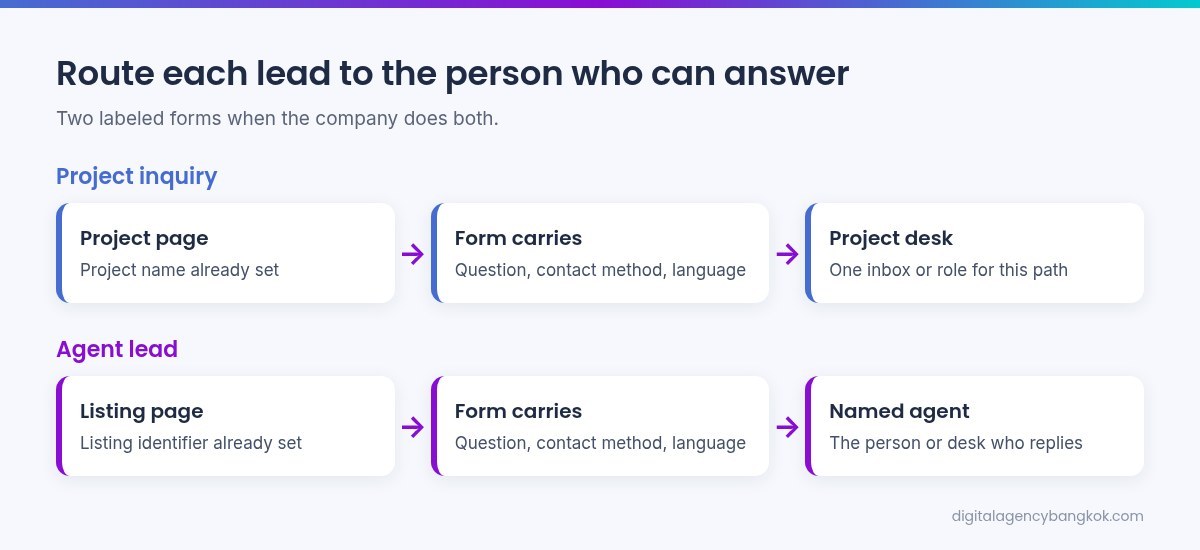
An agent lead asks about a listing or an area, and the form should say who will see it. Carry the agent name or the listing identifier the office uses. If nobody can name that identifier, there is nothing to automate yet.
If the company does both, use two forms, labeled on the button and the thank-you page. One inbox or one role per path. Write the split before you add software. Do not treat a test as demand, and do not promise a reply time.
What the form should carry
Carry the project name or listing identifier, the question, the contact method, and the language. Do not ask for a budget as a trick. Do not publish a lead count, a conversion rate, or a price. The project page submits a project inquiry with that name already set. The listing page submits an agent lead with that listing already set. A generic contact page may exist. It must not be the only path, and it must not be labeled as both.
A playbook the owner can run this month
This is a sequence, not a score. Do the first five if the week is short. Do not fill a slide with a volume or a rate this article refused to invent.
- Name the business: developer of named projects, agent or broker of listings, or both.
- List the public names, or listing types, the office will still honour. Remove anything staff will not discuss.
- Choose the first click: project index, listing by area, or agent list. Use the one a sales person would say first.
- Give each public project name one landing URL. Write what is still for sale in gallery language. Remove a register button the gallery will not honour.
- If both products exist, label two paths. Name who sees each. Send a test on a phone. Confirm the named person saw it. Do not count the test.
- If the office only represents a project, do not claim it built it. If it develops a project, do not make the page a market search. Hand the sentence to whoever edits the site.
What to hand a website team
Hand a source of truth, not a blank brief. The public names. Who replies to a project inquiry. Who replies to an agent lead. The gallery address and the phone that is answered. Photos the office may use. Status words staff already use. Do not publish a price the desk will not honour, a completion claim, or a unit count nobody will stand behind.
The team may structure the tree and the forms. They may not invent a project, merge two lead types, or add a portal search because a theme included one.
Before the next rebuild
Separate the trees if both exist. Give each public project name one landing URL. Label the two lead paths. Confirm a named person sees a test. Then talk about a rebuild. A new theme does not fix a menu that treats a launch and a brokerage as the same click, or a form that drops the project name before the inbox.
An owned hotel site versus more marketplace volume is another vertical, on hotel website SEO versus OTA dependence. Common breaks on property sites sit on why real estate websites fail in Thailand. A scoped conversation belongs on real estate web design. This page quotes no price, reports no inquiry count, and changes no live path. It does not link a Google Ads page or a hotel service page.
FAQ
Is a project developer website the same structure as an agent or broker site?
No. A developer site is named projects plus a project inquiry to the gallery. An agent site is listings or areas plus an agent lead that names who replies. One sitemap copied onto the other mixes the lead. A firm that does both needs two labeled paths, not a menu called “Properties.”
What should a project landing page include?
The public name, the place staff will confirm, what is still for sale in gallery language, and a project inquiry a named person will see. No invented price, unit count, or inquiry volume. One public name, one URL. The page should stay true if a portal listing pauses.
How should project inquiries and agent leads be routed?
As two labeled paths if the company does both. A project inquiry carries the project name to the role that replies for that project. An agent lead names the listing or area and who will see it. Write the rule before you add a tool. Do not count a test as demand.
Can one company run a developer site and an agent site?
Yes, if both are real businesses. Keep two trees, or two labeled sections, on the same domain. A project question should not land on “find me an agent” unless that person replies. A listing request should not land on a project inquiry. The button should name the request.
Where is the price, and how is this different from the sibling notes?
Not here. This page sets no fee, inquiry count, conversion rate, or rank. The hotel note is another vertical. The note on why real estate websites fail covers common breaks, not this structure. A scoped quote belongs on the real estate web design page.