

How to Optimize Website Image Sizes for Faster Loading

Many websites are designed to look visually impressive, using large high quality images and modern layouts. However, when users click into the site, they often experience longer loading times than expected. A common outcome is that visitors leave the page before the content fully loads, even though the business has already invested time and budget into building the website.
One of the main reasons websites load slowly is images, especially images that have not been optimized for web use. Images that look great in their original files often come with unnecessarily large file sizes, which directly affect page loading speed without the site owner realizing it.
Website loading speed does not only influence how users feel when browsing. It also impacts brand credibility, conversion opportunities, and Google search rankings. This article explains how optimizing images on your website can significantly improve loading speed and where to start in order to achieve real, measurable results.
Why Website Speed Matters More Than You Think
When users open a website, the first thing they notice is not the design or the content but the loading speed. If a page takes too long to display, user patience drops quickly, and many visitors choose to leave without waiting for the page to finish loading.
Website speed has a direct impact on user experience. Fast loading websites feel professional, easy to use, and well maintained. On the other hand, slow websites can make a business appear unreliable, even if the products or services themselves are high quality.

Beyond user perception, website speed is also a factor Google uses when ranking search results. Websites that load slower than competitors risk losing visibility on the first page of search results, which means missing consistent opportunities to reach new customers.
For businesses, website speed is not just a technical detail. It directly affects business outcomes such as enquiry rates, form submissions, and online purchases. A fast website reduces friction in the decision making process and increases the chances of turning visitors into customers.
How Images Affect Website Loading Speed
When discussing the causes of slow website performance, many people think about Web hosting or website code. In reality, images are often the most resource intensive elements on a web page. Just a few image files can add up to several megabytes and take significantly longer to load than other page elements.
A common issue is using original image files without any optimization. Photos taken from cameras or mobile devices usually have much higher resolution than what is needed for website display. When these large files are uploaded directly, the browser must download more data, causing slower loading times, especially on mobile devices or slower internet connections.
Images impact loading speed across many areas of a website, including the homepage, product pages, and blog articles. When a single page contains many large images, loading performance drops immediately. Users may see incomplete layouts or images loading slowly as they scroll, which negatively affects the overall browsing experience.
How to Optimize Website Images for Faster Loading
- Use image sizes that match the display area
Website images do not need the same resolution as original camera or mobile files. What matters is that the image size matches where it is actually displayed, whether it is a banner image, product image, or blog illustration. When a small display area uses a large image file, the website takes longer to load without providing any added value.

- Choose the right image file format
Image file formats directly affect file size and visual quality. JPEG is commonly suitable for general website images because it keeps file sizes smaller while maintaining good quality. PNG works well for images that require transparent backgrounds. If the website supports it, using WebP can further reduce file size while preserving image clarity.

- Compress images before uploading to the website
Image compression significantly reduces file size while maintaining visual quality that most users will not notice. Compressed images allow pages to load faster immediately and also help save website storage space over time.

- Use descriptive file names and meaningful Alt Text
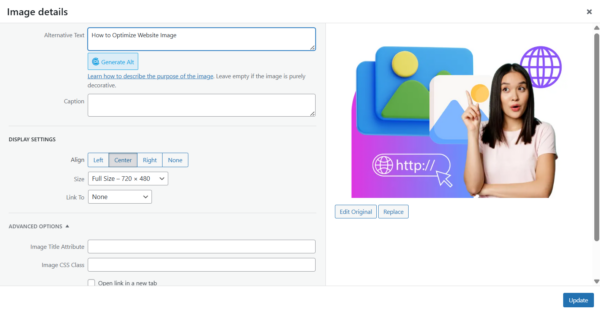
Naming image files properly and adding Alt Text supports more than just SEO. It helps search engines better understand image content. Clear file names and descriptive Alt Text improve website structure and increase the chance of images appearing in Google Image search results.
- Load images only when they are needed
Websites can be configured to load images only when users scroll to their position instead of loading all images at once. This approach allows pages to display faster, especially on pages with many images such as landing pages or long articles.
Should Businesses Handle Image Optimization Internally or Work with Professionals
Optimizing images may seem like a small task, but it requires an understanding of user experience, website structure, and SEO principles. Businesses with an in house website team can handle basic image sizing and compression to improve loading speed to a certain level.
However, for websites that aim for long term results, such as corporate websites, ecommerce websites , or lead generation sites, working with professionals provides greater value. Professional teams manage everything from website structure to image optimization, helping prevent future issues such as performance slowdowns as content grows or SEO challenges that affect search rankings.
Conclusion
Optimizing website images for faster loading is one of the most effective improvements that can be implemented immediately. Properly managed images help websites load faster, improve user experience, and increase visibility on Google compared to competitors.
Although these optimizations may not be visible on the surface, they strongly influence brand perception and business performance. Fast loading websites that deliver smooth experiences and well managed elements form a strong foundation for long term digital marketing success.
If you are looking for a team that understands website development, design, and full service digital marketing, Digital Agency Bangkok is ready to help build website structures that support both user experience and business growth.
Contact us for a free consultation
Phone: 098-7655-243 or 098-7655-701
Email: [email protected]