



Duplicate Google Business Profile Listings: What You Should Actually Do

Duplicate Google Business Profile Listings: What You Should Actually Do
Discovering that a business has two — or sometimes three or four — listings showing up on Google Maps is a genuinely common problem, and it's more disruptive than it might first appear. Reviews get split across different versions of the same business, customers occasionally show up expecting a location that no longer exists, and search visibility often suffers because Google's systems are essentially trying to represent one business as if it were several. The good news is that resolving duplicate listings is a well-understood process, though it does require identifying exactly which type of duplicate situation is actually occurring, since the fix genuinely differs depending on the specifics.
This article walks through why duplicate listings happen, how to properly identify them, and the actual steps to resolve different types of duplicate situations correctly.
Why Duplicate Listings Happen in the First Place
Common Causes
- Multiple people creating a profile independently — a business owner, a marketing agency, and a well-meaning employee each separately creating a Google Business Profile for the same location, unaware that one already existed.
- A business move or rebrand without properly updating the old listing — leaving an outdated listing active at a previous address or under a previous name, alongside a newer, correct listing.
- Data aggregator errors — third-party data providers that feed business information to Google sometimes submit slightly inconsistent business details, which Google's systems can occasionally interpret as a separate business rather than recognizing it as the same one.
- Slight inconsistencies in business name, address, or phone number across different listings or directory submissions, which can prevent Google's systems from automatically recognizing that two profiles represent the same business.
Why This Matters Beyond Simple Inconvenience
Duplicate listings dilute a business's online presence in several concrete ways — splitting reviewmus and star ratings across ltiple profiles rather than consolidating them into one strong, credible listing, confusing customers about which listing to trust or visit, and potentially reducing overall visibility in local search results, since Google's algorithms may struggle to confidently rank a business that appears fragmented across multiple, sometimes inconsistent entries.
How to Actually Identify Duplicate Listings
Search Directly and Carefully
- Search the business name directly on Google and Google Maps, paying close attention to the local map pack results and any listings that appear alongside it.
- Look specifically for slight name variations — abbreviations, old business names, minor spelling differences — since duplicates don't always share an exact, identical name.
- If the business operates multiple locations, be careful not to mistake a duplicate for a genuinely separate, legitimate branch location.
Check the Google Business Profile Dashboard Directly
Google's own dashboard sometimes proactively flags a location's status as "Duplicate," which is generally the clearest, most direct signal that Google's own systems have already identified a conflict requiring resolution.
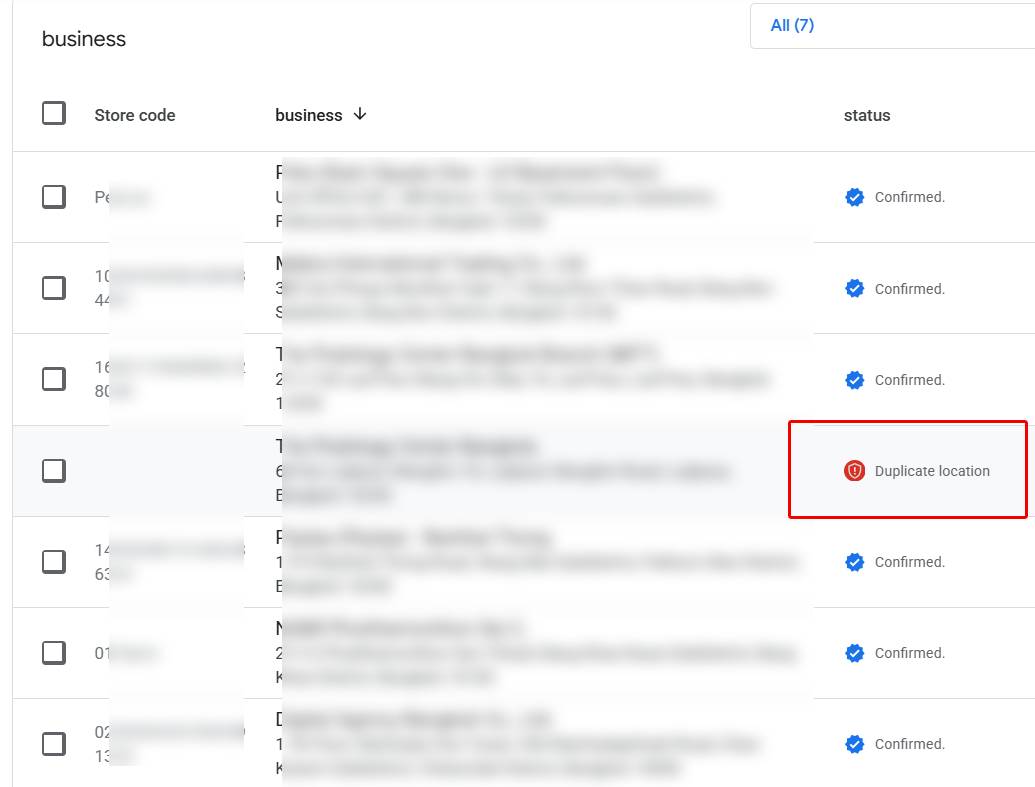
Understanding the Different Types of Duplicate Situations
This is the step many business owners skip, and it's the reason so many attempts to fix duplicate listings go wrong or stall entirely — the correct fix depends heavily on which of these specific situations is actually occurring.
Situation One: You Own and Have Access to Both Listings
If both the correct listing and the duplicate exist within a Google account you control, this is generally the most straightforward scenario to resolve directly.
Situation Two: One Listing Is Verified by You, the Other Is Unclaimed
If the duplicate listing has never been claimed by anyone, it can typically be addressed by suggesting an edit directly on that specific listing, flagging it as a duplicate of the correct, verified location.
Situation Three: Both Listings Are Verified, but by Different People or Accounts
This is a more complicated scenario — for example, when a former employee, a previous owner, or an outside marketing agency verified a listing under their own account rather than the business's own account, and that access was never properly transferred. This typically requires requesting ownership of the listing you don't currently control, rather than simply attempting to delete or merge it directly.
Situation Four: The Business Genuinely Moved, and the Old Location Listing Wasn't Properly Updated
If a business relocated and an old listing at the previous address is still active, this isn't always a true "duplicate" in the strictest sense — it may need to be marked as moved or permanently closed, rather than merged, depending on the specific circumstances.
Resolving Duplicates You Own and Control
Steps Within the Google Business Profile Dashboard
- Log into the Google Business Profile dashboard using the account that manages the business's listings.
- Navigate to the section managing multiple business locations, where Google sometimes surfaces alerts about detected duplicates directly.
- Carefully identify which listing is the duplicate and which is the correct, primary listing you want to keep — checking that the listing being kept has accurate information, verification status, and ideally existing reviews and photos already associated with it.
- Select the duplicate listing specifically, being careful not to select the correct, primary listing by mistake, and use the option to remove or delete it.
Choosing the Right Listing to Keep
- The listing you keep should have the most accurate current business name, address, phone number, and website.
- It should already be verified, since starting fresh with an unverified listing after removing a verified one can create unnecessary additional delay.
- If one listing has significantly more reviews, photos, or engagement history than the other, that's generally a strong reason to keep it as the primary listing rather than the newer or less established one.
Resolving an Unclaimed Duplicate
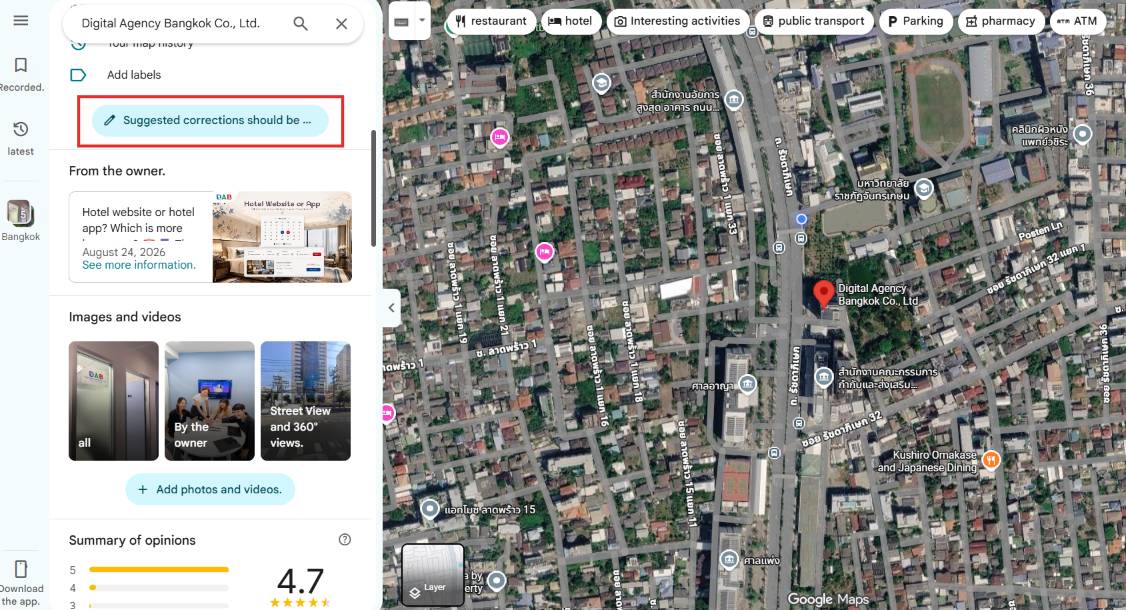
Using the "Suggest an Edit" Feature on Google Maps
- Search for and open the specific duplicate listing on Google Maps.
- Select the option to suggest an edit to that listing.
- Choose the option indicating the listing should be closed or removed.
- Specify that it's a duplicate of another, already-existing location, and provide the correct listing for reference where prompted.
This approach relies on Google's own review process to confirm and act on the suggested edit, meaning it isn't always immediate — Google reviews these suggestions before making a final determination, rather than removing a listing automatically the moment an edit is suggested.
Resolving a Duplicate Verified by Someone Else
Requesting Ownership
If a duplicate listing is already verified, but not by an account you control, the correct path is requesting access to that listing directly, rather than trying to create a new listing or report it purely as a duplicate. Google's system typically provides a specific option to request ownership when this situation is detected, prompting steps to demonstrate a legitimate connection to the business in question.
When Both Locations Are Published, but One Is Unclaimed and Represents the Same Business
In this scenario, gathering the exact URLs for both the verified and unverified listings, then reaching out directly to Google Business Profile support with a clear request to merge the two, is often the more reliable path — particularly when the "suggest an edit" approach hasn't produced a resolution within a reasonable time.
What to Do If the Listings Represent a Genuine Move, Not a True Duplicate
Updating Rather Than Deleting
If a business has moved locations, the old listing generally shouldn't simply be deleted outright — instead, updating that older listing's address to reflect the new location (assuming it's the account-controlled, verified listing being kept) is often the more appropriate approach, since deleting a listing outright can sometimes result in losing accumulated reviews and history that would otherwise carry forward with an address update instead.
A local bakery that relocated to a new storefront two blocks away, for example, might discover that customers searching for it are being shown an old listing still displaying the previous address, alongside a newer listing created after the move. Rather than simply deleting the older listing — which would also delete the years of accumulated reviews attached to it — updating that original, verified listing's address to the correct new location, then addressing the newer, duplicate listing separately as an unclaimed or accidental duplicate, generally preserves more of the business's existing credibility and review history than starting over with an entirely fresh listing would.
What to Expect During the Resolution Process
Google Controls the Final Outcome
It's worth being realistic about this part of the process: regardless of which specific path is used to address a duplicate, Google's own systems and review team make the final determination about removal or merging — a business can request, report, and provide supporting information, but cannot force an immediate, guaranteed resolution unilaterally.
Timelines Can Vary Considerably
- Straightforward cases, particularly duplicates fully controlled within a single account, can sometimes be resolved quickly, directly through the dashboard.
- Cases requiring Google's review — suggested edits, ownership requests, or direct support outreach — can take longer, sometimes spanning days to weeks, depending on the specific circumstances and how clearly the supporting information demonstrates the correct resolution.
Keep Both Listings Until the Situation Is Fully Resolved
A useful general principle throughout this entire process: avoid deleting either listing prematurely until it's genuinely clear which one should represent the business going forward, since a hasty deletion can sometimes result in losing access to valuable existing history, reviews, or verification status that would have been better preserved by carefully updating or merging rather than removing outright.